Migrating My Personal Domain to Cloudflare Without Breaking Trojan-Go
How I migrated my domain registrar, enabled Cloudflare CDN, and kept Trojan-Go over WebSocket working flawlessly.
Why I Decided to Move
For years, my domain was registered with Tencent Cloud.
Everything worked fine, but there were several reasons I finally decided to move:
- Lower renewal cost through Cloudflare Registrar
- Better DNS management
- Built-in DDoS protection
- Global Anycast CDN
- Easier SSL management
- Better support for future projects (Workers, R2, AI Gateway, etc.)
The biggest concern wasn’t the website.
It was Trojan-Go.
My website and Trojan-Go share the same domain, and I wasn’t sure whether enabling Cloudflare Proxy (the famous orange cloud) would break WebSocket traffic.
My Existing Architecture
Before migration, my server looked like this:
                Internet
                    │
            HTTPS / WSS :443
                    │
             Trojan-Go Server
      ┌─────────────┴─────────────┐
      │                           │
  WebSocket                 HTTPS Website
  /chat-bot                 fallback
      │                           │
      │                    Apache :1234
      │                           │
   Trojan                    Personal Website
Apache never handled TLS directly.
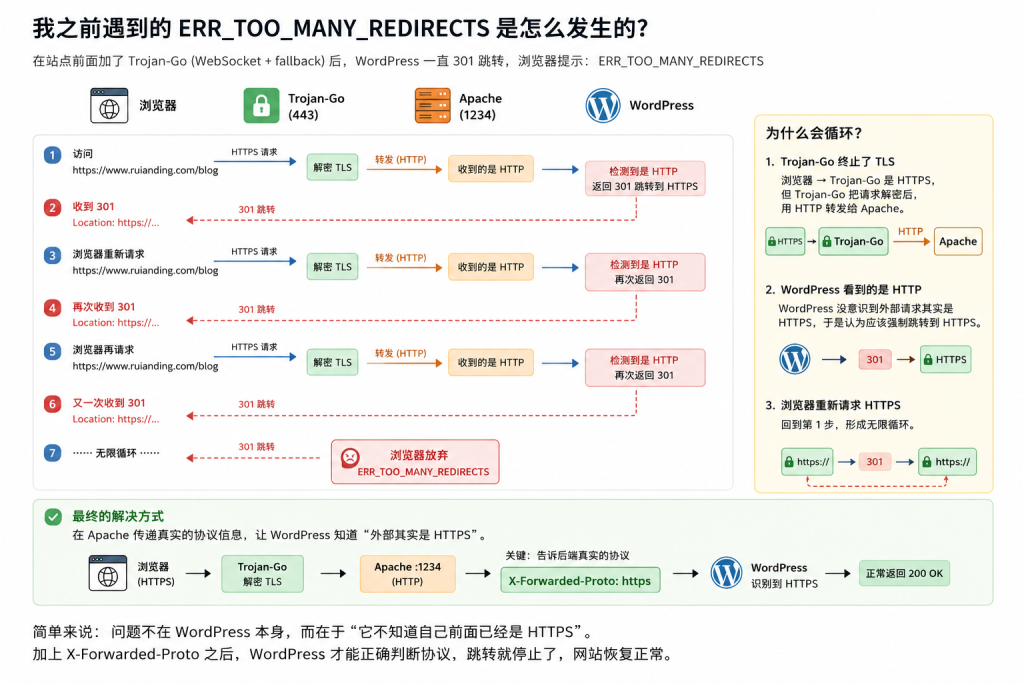
Trojan-Go terminated TLS on port 443, and every normal HTTPS request fell back to Apache running on port 1234.
This architecture turned out to be extremely important.
Step 1 — Transfer DNS First
Instead of transferring the registrar immediately, I first moved DNS hosting to Cloudflare.
Cloudflare automatically imported all existing DNS records.
After changing the authoritative nameservers, Cloudflare became responsible for DNS resolution while Tencent Cloud still remained the registrar.
This approach minimized risk because the website continued working throughout the migration.
Step 2 — Transfer the Registrar
Once DNS propagation completed, I transferred the registrar to Cloudflare.
The transfer process was straightforward:
- Unlock the domain
- Obtain the EPP/Auth Code
- Submit the transfer
- Wait for the previous registrar to release the domain
Cloudflare automatically added one extra year to the domain registration.
Step 3 — The Biggest Question
Should I enable the orange cloud?
This was the part I was most worried about.
Many people say:
Don’t proxy Trojan.
Others say:
Cloudflare works perfectly.
The truth depends entirely on how Trojan is deployed.
My Trojan-Go Configuration
My configuration is essentially:
{
	"local_port": 443,
	"remote_port": 1234,
	"ssl": {
		"fallback_port": 1234
	},
	"websocket": {
		"enabled": true,
		"path": "/chat-bot",
		"host": "www.ruianding.com"
	}
}
Important details:
- TLS terminates inside Trojan-Go
- Apache only serves plain HTTP
- Normal HTTPS requests fall back to Apache
- Trojan traffic uses WebSocket
- Website and Trojan share the same port
Why It Actually Works
Many people assume Cloudflare only works for websites.
That’s not true.
Cloudflare officially supports WebSocket proxying.
When a client connects:
Client
│
Cloudflare Edge
│
WebSocket Upgrade
│
Trojan-Go
Cloudflare simply forwards the upgraded WebSocket connection.
The /chat-bot endpoint is not cached.
Only normal website resources (CSS, JS, images, fonts, etc.) benefit from CDN caching.
Enabling Cloudflare Proxy
Eventually I switched both records to Proxied.
ruianding.com
www.ruianding.com
After about thirty seconds:
nslookup ruianding.com
returned:
104.x.x.x
172.x.x.x
which are Cloudflare Anycast addresses.
At that point:
- Website worked
- Trojan connected successfully
- No configuration changes were required
Honestly, it was much smoother than I expected.
Current Architecture
                Internet
                     │
             Cloudflare Edge
                     │
             HTTPS / WSS :443
                     │
                Trojan-Go
         ┌───────────┴───────────┐
         │                       │
    /chat-bot              fallback
         │                       │
     Trojan Client         Apache :1234
                                │
                           Personal Website
Cloudflare now acts as:
- DNS provider
- Global proxy
- CDN
- TLS endpoint for visitors
while Trojan-Go still handles encrypted traffic to the origin.
What About CDN?
One misconception is that enabling Cloudflare automatically caches everything.
It doesn’t.
My traffic now looks like this:
Website
/index.html
/css/*
/js/*
/images/*
│
▼
Cloudflare CDN
Trojan
/chat-bot
│
▼
Proxy only
(No cache)
Static assets are accelerated.
WebSocket traffic is simply proxied.
Both services coexist without interfering with each other.
Useful Cloudflare Settings
These are the settings I’m currently using:
- HTTP/2
- HTTP/3
- HTTP/2 to Origin
- TLS 1.3
I also recommend enabling:
- Always Use HTTPS
- Full (Strict) SSL (if your origin certificate supports it)
I intentionally didn’t enable aggressive cache rules, because my website contains dynamic content and shares the same domain with Trojan.
Lessons Learned
The biggest lesson wasn’t about Cloudflare.
It was about architecture.
Using:
- Trojan-Go
- WebSocket
- TLS on port 443
- HTTP fallback
- Apache behind the proxy
creates a surprisingly clean design.
Cloudflare doesn’t need to understand Trojan.
It only needs to proxy HTTPS and WebSocket traffic correctly.
Once I realized that, the migration became much less scary.
Final Thoughts
This migration achieved everything I wanted:
- Lower renewal cost
- Better DNS management
- Global CDN
- HTTP/3
- TLS 1.3
- DDoS protection
- Trojan-Go remained fully functional
The best part?
I didn’t have to redesign my infrastructure.
Everything continued working exactly as before—just faster and with a much stronger edge network.
Conclusion
If you’re running Trojan-Go over WebSocket with HTTP fallback, don’t assume Cloudflare Proxy will break your setup.
In my case, it worked out of the box.
The migration ended up being far less about moving a domain and far more about modernizing my entire infrastructure.