使用 GitHub Copilot SDK 暴露 OpenAI-Compatible API
一、背景
很多公司已经购买了 GitHub Copilot Business / Enterprise License。
但实际使用过程中,大家通常只是在:
- VSCode
- JetBrains
- GitHub Web
里使用代码补全。
实际上,现在 GitHub 已经提供了:
- Copilot SDK
- Agent Runtime
- 多模型支持
- Tool / MCP 能力
这意味着:
我们完全可以把公司已有的 Copilot License 当成:
企业内部 AI Provider
来使用。
例如:
Claude Code
Cline
OpenHands
RooCode
Continue
这些 Agent 工具,本质上都依赖:
OpenAI-Compatible API
因此我们可以自己搭建:
GitHub Copilot SDK
        ↓
OpenAI-Compatible Gateway
        ↓
Claude Code / Agent System
这样就能:
- 使用公司的 Copilot License
- 使用 GitHub 官方支持的模型
- 使用 GPT-5 mini
- 使用 Claude Sonnet 4
- 接入自己的 Agent 系统
- 对接 MCP / Tool / SOP 系统
本文会从零开始,完整搭建整个系统。
二、最终效果
最终我们会得到:
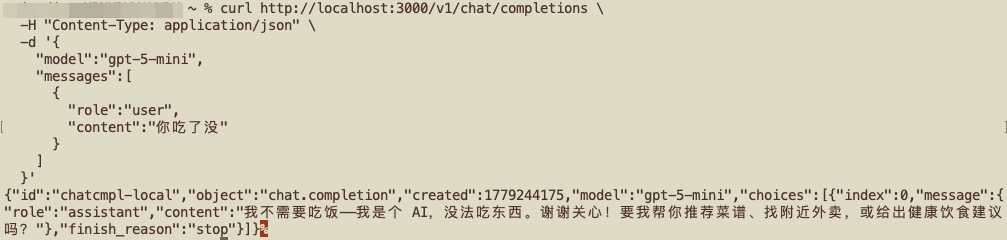
http://localhost:3000/v1/chat/completions
任何支持 OpenAI-Compatible API 的工具都能直接使用。
例如:
Claude Code
Cline
Continue
OpenHands
都可以直接接入。
最终架构如下:
Claude Code / Agent
        ↓
OpenAI-Compatible API
        ↓
GitHub Copilot SDK
        ↓
GitHub Copilot Runtime
        ↓
GPT-5 mini / Claude / Gemini
三、为什么不直接调用 OpenAI API?
很多企业已经购买了 Copilot License。
因此:
Copilot 已经包含模型额度
如果继续单独购买:
- OpenAI API
- Anthropic API
- Gemini API
实际上会造成重复成本。
而且现在 GitHub Copilot 已经支持:
| 模型 | 支持情况 |
|---|---|
| GPT-5 mini | 支持 |
| Claude Sonnet 4 | 支持 |
| Gemini 2.5 Pro | 支持 |
| GPT-4.1 | 支持 |
| o4-mini | 支持 |
因此完全可以把 Copilot 当成企业内部统一模型 Provider。
四、为什么需要 OpenAI-Compatible Gateway?
因为:
Copilot SDK ≠ OpenAI API
Copilot SDK 使用的是:
Session Runtime
Permission System
Event Stream
Tool Runtime
它不是传统的:
POST /v1/chat/completions
因此:
Claude Code 无法直接使用 Copilot SDK
所以我们需要:
自己实现一个兼容 OpenAI API 的 Bridge
五、环境准备
本文环境:
| 项目 | 版本 |
|---|---|
| macOS | 推荐 |
| Node.js | >= 20 |
| npm | 最新 |
| GitHub CLI | 最新 |
六、安装 Node.js
检查版本:
node -v
如果未安装:
方式一:官网下载
方式二:使用 brew
brew install node
安装完成后再次确认:
node -v
npm -v
七、安装 GitHub CLI
安装:
brew install gh
确认:
gh --version
八、登录 GitHub
执行:
gh auth login
选择:
GitHub.com
HTTPS
Login with browser
浏览器授权即可。
九、确认 Copilot License 可用
执行:
gh copilot suggest "write a python web server"
如果成功返回内容:
说明:
Copilot License 已生效
十、创建项目
创建目录:
mkdir copilot-openai-gateway
cd copilot-openai-gateway
初始化:
npm init -y
十一、安装依赖
安装 Copilot SDK
npm install @github/copilot-sdk
安装 Express
npm install express cors
十二、修改 package.json
增加:
"type": "module"
最终示例:
{
  "name": "copilot-openai-gateway",
  "version": "1.0.0",
  "type": "module",
  "main": "index.mjs"
}
十三、创建 Gateway 服务
创建:
index.mjs
这是整个系统的核心。
完整代码如下。
十四、完整代码
import express from "express";
import cors from "cors";

import {
  CopilotClient
} from "@github/copilot-sdk";

const app = express();

app.use(cors());
app.use(express.json());

const client = new CopilotClient();

await client.start();

console.log("starting copilot gateway...");

app.post("/v1/chat/completions", async (req, res) => {

  try {

    const body = req.body;

    const messages = body.messages || [];

    const model = body.model || "gpt-5-mini";

    const prompt = messages
      .map(m => `${m.role}: ${m.content}`)
      .join("\n");

    console.log("request model:", model);

    const session = await client.createSession({

      model,

      hooks: {},

      onPermissionRequest: async () => ({
        kind: "approved"
      })
    });

    const response = await session.sendAndWait({
      prompt
    });

    console.log(response);

    const content =
      response?.data?.content ||
      JSON.stringify(response);

    res.json({
      id: "chatcmpl-local",
      object: "chat.completion",
      created: Math.floor(Date.now() / 1000),
      model,
      choices: [
        {
          index: 0,
          message: {
            role: "assistant",
            content
          },
          finish_reason: "stop"
        }
      ]
    });

  } catch (err) {

    console.error(err);

    res.status(500).json({
      error: err.message,
      stack: err.stack
    });
  }

});

app.listen(3000, () => {
  console.log("gateway running on http://localhost:3000");
});
十五、启动服务
执行:
node index.mjs
如果看到:
starting copilot gateway...
gateway running on http://localhost:3000
说明 Gateway 已成功启动。
十六、测试 API
新开一个终端。
执行:
curl http://localhost:3000/v1/chat/completions \
  -H "Content-Type: application/json" \
  -d '{
    "model":"gpt-5-mini",
    "messages":[
      {
        "role":"user",
        "content":"write python hello world"
      }
    ]
  }'
成功后会返回:
{
  "choices": [
    {
      "message": {
        "content": "print('hello world')"
      }
    }
  ]
}
十七、为什么会出现 Permission Error?
很多人第一次运行会报错:
An onPermissionRequest handler is required when creating a session
原因是:
Copilot SDK 是真正的 Agent Runtime
模型可能会:
- 执行 shell
- 修改文件
- 调用 tool
- 调用 MCP
因此必须提供权限回调。
本文中使用:
onPermissionRequest: approveAll
表示:
允许所有权限
十八、approveAll 的风险
approveAll 虽然方便。
但风险很高。
因为后续如果接入:
Claude Code
OpenHands
Cline
模型可能会:
- 删除文件
- 修改 Git 仓库
- 执行危险 shell
- 修改系统配置
因此生产环境建议自行实现权限系统。
例如:
onPermissionRequest: async (req) => {

  if (req.kind === "shell") {

    if (
      req.command.includes("rm") ||
      req.command.includes("sudo")
    ) {
      return {
        kind: "denied"
      };
    }
  }

  return {
    kind: "approved"
  };
}
十九、让 Claude Code 使用 Gateway
配置:
export OPENAI_BASE_URL=http://localhost:3000/v1
export OPENAI_API_KEY=dummy
然后执行:
claude
即可。
二十、如果 Claude Code 不识别 OpenAI Provider
某些版本需要:
export CLAUDE_CODE_USE_OPENAI=1
或者:
claude --provider openai
不同版本行为可能不同。
二十一、动态切换模型
目前我们已经支持:
{
  "model":"gpt-5-mini"
}
也可以:
{
  "model":"claude-sonnet-4"
}
或者:
{
  "model":"gemini-2.5-pro"
}
只要企业策略允许即可。
二十二、查看有哪些模型
可以增加:
app.get("/v1/models", async (_, res) => {

  const models = await client.models.list();

  res.json(models);
});
然后执行:
curl http://localhost:3000/v1/models
即可查看当前可用模型。
二十三、为什么 response.data.content 有时为空?
因为:
Copilot SDK 本质是 Event Stream
它并不是传统 Completion API。
因此:
response.data.content
有时可能为空。
后续建议改为:
sendAndStream()
或者:
session.on("event")
进行流式监听。
二十四、当前版本的缺点
目前实现是:
每次请求都 createSession
缺点:
- 慢
- 丢失上下文
- Token 消耗大
- 无法保留 Agent Memory
二十五、后续优化方向
1. Session Cache
应该实现:
userId -> session
长期保活。
2. Streaming
实现:
text/event-stream
体验会大幅提升。
3. Tool System
例如:
ELK
Grafana
Jenkins
MySQL
都可以封装成 Tool。
4. MCP
Copilot SDK 原生支持 MCP。
非常适合企业内部工具系统。
5. 多 Agent 系统
例如:
日志分析 Agent
SOP Agent
Root Cause Agent
SQL Agent
这些都可以挂到统一 Gateway。
二十六、GPT-5 mini 是否适合 Agent?
非常适合:
- Tool Call
- SOP
- 运维自动化
- 日志分析
- Workflow Agent
- 小步推理
但不太适合:
- 超复杂架构设计
- 长链路深度推理
- 大规模 Refactor
复杂场景建议:
Claude Sonnet 4
Gemini 2.5 Pro
二十七、Copilot 与原始 OpenAI API 的区别
GitHub Copilot 并不是原始 OpenAI API。
GitHub 在中间增加了:
- 安全过滤
- Secret Scanning
- Policy Layer
- 内容限制
因此有时会出现:
OpenAI 能回答
Copilot 不给回答
这是正常现象。
二十八、这个架构真正的价值
很多人只是把它当成:
白嫖公司额度
但实际上:
它真正的价值在于:
企业级 AI Gateway
未来完全可以发展成:
Task-oriented Agent System
例如:
用户问题
    ↓
Agent Planner
    ↓
Tool Orchestration
    ↓
ELK / Grafana / Jenkins / SOP
    ↓
Root Cause Analysis
这已经不是简单聊天机器人。
而是真正的:
任务导向型智能体系统
二十九、最终推荐架构
推荐最终形态:
Claude Code / OpenHands / Cline
                ↓
        OpenAI-Compatible Gateway
                ↓
          Copilot SDK Runtime
                ↓
      GPT-5 mini / Claude / Gemini
                ↓
        MCP / Tool / 企业系统
这样后续:
- 更换模型
- 更换 Agent
- 接入 MCP
- 增加 Tool
- 增加 Memory
- 增加 Workflow
都会非常容易。
三十、总结
本文完整实现了:
- 使用 GitHub Copilot SDK
- 使用企业 Copilot License
- 暴露 OpenAI-Compatible API
- 支持 GPT-5 mini
- 接入 Claude Code
- 构建 AI Gateway
这套架构后续完全可以继续扩展:
- 多 Agent
- Memory
- Tool System
- MCP
- Workflow
- Task-oriented Agent System
对于企业内部运维、SOP、故障排查、自动化系统来说,这条路线非常值得深入探索。